Pinterest Downloader
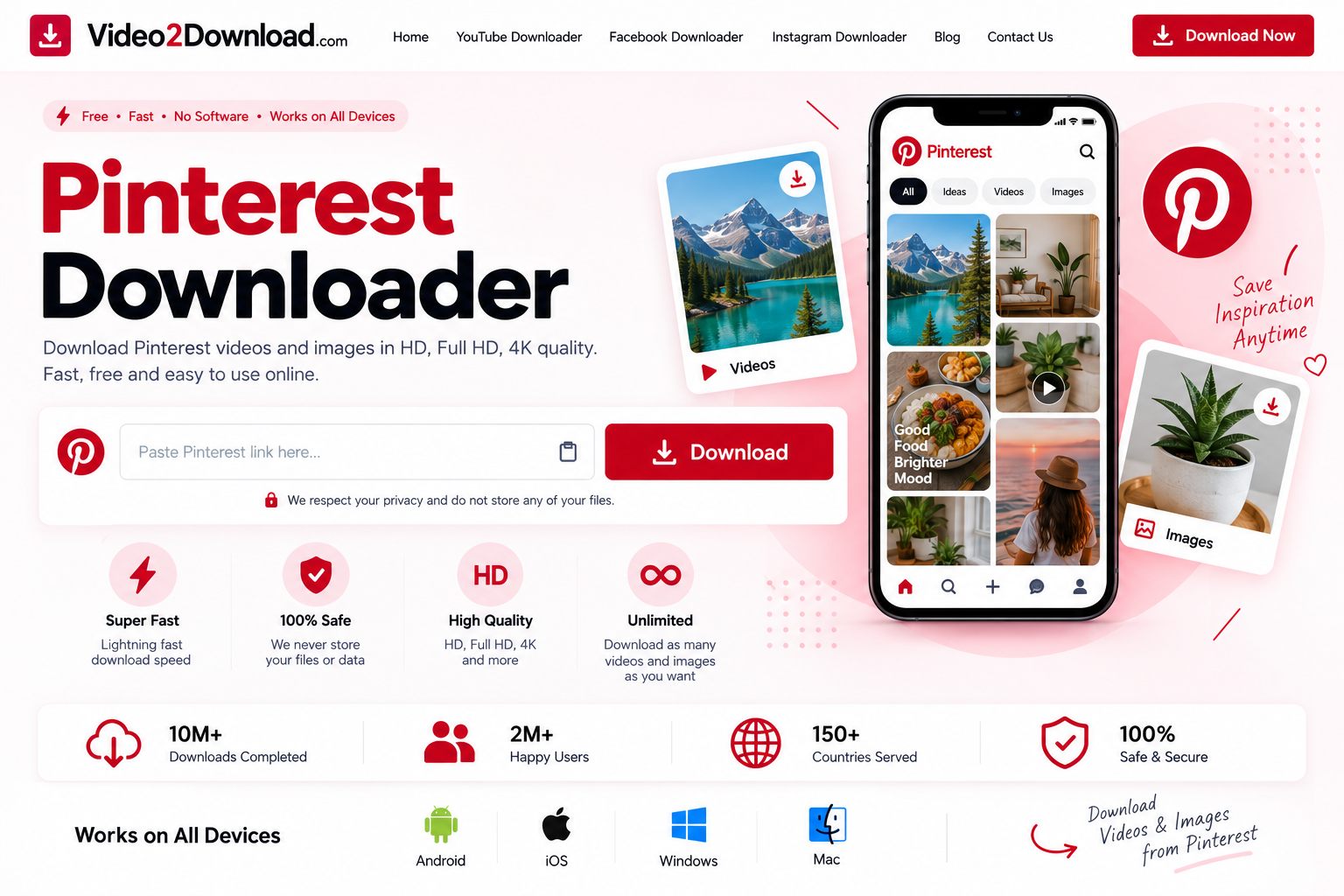
Pinterest Downloader is an online tool for processing supported Pinterest links and downloading available videos and images to your device. Simply copy a Pinterest URL, paste it into Video2Download, and check the available download options.
Video2Download is designed to make online video download simple from your browser. You can use the service on a computer, smartphone or tablet without needing specialized software for the basic process.
Whether you are looking for a Pinterest Video Downloader, an image downloader, an online video downloader, or a convenient way to download videos online, Video2Download provides a straightforward link-based workflow.
Important: Only download content that you own, have permission to download, or are otherwise legally authorized to save and use. Downloading a file does not transfer copyright ownership or permission to redistribute the content.
Pinterest Video Downloader
The Pinterest Video Downloader is designed for users who want to process a supported Pinterest video URL.
Pinterest contains a wide variety of visual content, including short videos, tutorials, recipes, fashion inspiration, travel clips, DIY projects and other creative material.
When you have permission to save a video, you can use its URL with Video2Download.
The basic process is:
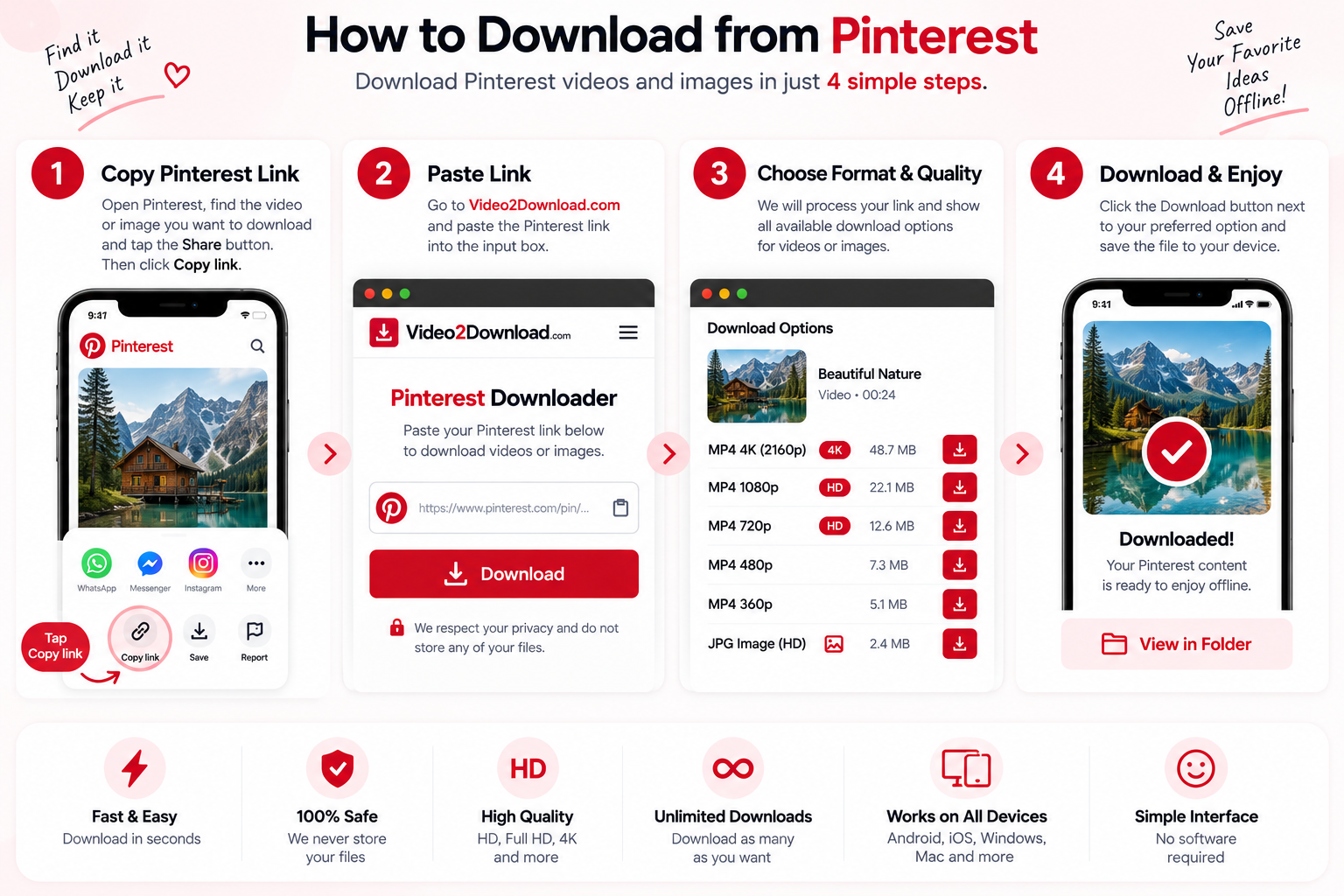
Copy the Pinterest link → Paste the link → Process → Choose an available option → Download
There is no need to understand complicated technical processes. The downloader is designed around a simple URL workflow.
If you are looking for a general online video downloader, Video2Download also provides dedicated pages for other supported platforms.
Download Pinterest Videos Online
Many users search for ways to download videos online without installing additional software.
With Video2Download, you can start with the URL of a supported Pinterest video.
How it works
- Open Pinterest.
- Find the video you want to save.
- Copy its link.
- Open Video2Download.
- Paste the Pinterest URL.
- Start processing.
- Review the available result.
- Select an available download option.
- Save the file to your device.
The exact available format and quality depend on the original source and technical compatibility.
Not every Pinterest URL is guaranteed to produce a downloadable result.
Online Video Downloader for Pinterest
An online video downloader allows you to process supported video links through a web browser.
This can be convenient if you do not want to install a separate application.
Video2Download is designed for browser-based access, allowing users to process supported links from:
- Windows PCs
- Mac computers
- Android phones
- iPhones
- iPads
- Tablets
- Laptops
The same basic workflow can be used across supported devices.
Download Video Online
If you are searching for a way to download video online, the process starts with the URL of the video.
A Pinterest link can be copied from the Pinterest application or website and then submitted to the downloader.
The downloader processes the submitted URL and, when supported, provides available options.
The source determines what can actually be retrieved. If a video has been deleted, made private, restricted or otherwise become inaccessible, processing may not be possible.
Pinterest Image Downloader
Pinterest is not only a video platform. Images are one of its most important types of content.
A Pinterest Image Downloader can be useful when you want to save an image that you are authorized to download.
You may find:
- Photos
- Illustrations
- Graphics
- Recipes
- Infographics
- Wallpapers
- Design references
- Product images
- Travel images
- Educational graphics
The rights associated with an image depend on its creator and source.
Saving an image for personal reference does not automatically give you permission to publish it elsewhere.
Download Images From Pinterest
To download a supported Pinterest image:
- Open Pinterest.
- Locate the image.
- Open the Pin.
- Copy its URL.
- Paste the URL into the appropriate Video2Download field.
- Process the link.
- Choose an available image option.
- Save the file.
Image availability and quality can vary depending on the original Pin.
For images that you own, keeping the original file is always preferable when possible.

Pinterest Downloader Online
A Pinterest Downloader Online provides access through your browser rather than requiring a dedicated desktop application.
This makes it convenient for users who move between different devices.
You can access Video2Download from a compatible browser and submit a supported Pinterest URL.
The service is intended to provide a simple experience for users who want to process links without dealing with complicated software installation.
Free Online Video Downloader
If you searched for download video online free, online video downloader free, or download videos online free, you may be looking for a browser-based solution that does not require a conventional subscription.
Video2Download provides online downloader functionality for supported URLs.
However, “free” does not mean unrestricted.
Users must still respect:
- Copyright
- Privacy
- Creator rights
- Platform rules
- Applicable laws
- Access restrictions
A free downloader does not give users permission to copy or redistribute content they do not have rights to use.
Online Video Downloader Free
An online video downloader free service can be useful when you want to process an individual video URL without purchasing specialized software.
Video2Download is designed around a simple process:
URL → Process → Available result → Save
You should always verify that you have the right to download and use the content before submitting a URL.
Download Videos Online Free
People search for download videos online free for many different reasons.
For example, you might want to keep a copy of your own published video, back up authorized content, or save material that is explicitly provided for downloading.
The purpose of the download matters.
A downloaded file should only be used in ways that are permitted by the copyright owner, applicable license, platform rules and relevant law.
Pinterest Video Downloader HD
If you want higher video quality, the Pinterest Video Downloader HD section can help you understand the available options.
Video quality depends primarily on the original source.
Possible resolutions can vary and may include standard definition, HD or other available versions.
Higher resolution can provide more detail, but it also normally produces a larger file.
Choose the quality that fits your needs
Standard quality
Useful when storage space and download size are important.
HD
A good balance between quality and file size.
Full HD
Useful when higher detail is important and the source provides it.
Higher resolution
Only available when supported by the original source.
A downloader cannot create genuine detail that does not exist in the original video.
Pinterest Video Downloader 4K
Some users specifically search for a Pinterest Video Downloader 4K.
4K availability depends on the source.
If the original Pinterest content is not available in genuine 4K, downloading it cannot magically create true 4K detail.
When multiple quality options are available, choose the highest genuine resolution provided by the source.
Remember that higher-quality files generally require more storage space and bandwidth.

Pinterest Video Downloader Without Watermark
Another common search intent is Pinterest Video Downloader Without Watermark.
A watermark can identify the platform, creator or source of content.
Users should understand that downloading a file does not automatically give them permission to remove copyright information or creator attribution.
If you own the video, the best way to obtain a clean version is normally to use your original source file.
If someone else created the content, do not remove attribution and then present the material as your own.
Pinterest Downloader by Link
A Pinterest Downloader by Link is useful when you already have the URL of a specific Pin.
You do not need to search for the content again.
Simply:
Copy the Pin URL → Paste it into Video2Download → Process the link
This approach can be particularly useful when a Pinterest Pin was shared with you through:
- Messenger
- Another website
- A direct Pinterest message
Always make sure you are submitting the correct URL.
Pinterest Video Downloader Link
A Pinterest Video Downloader Link workflow begins with the Pinterest video URL.
If you have a supported URL, paste it into the downloader and start processing.
If the URL does not work, check whether:
- The URL was copied completely
- The Pin still exists
- The content is public
- The source is supported
- The video is accessible
- There is a temporary technical problem
Pinterest Downloader for Android
You can use Video2Download on a compatible Android browser.
Android instructions
1. Open Pinterest
Find the content you are authorized to download.
2. Copy the link
Use the sharing options to copy the Pin URL.
3. Open Video2Download
Visit the Pinterest Downloader page.
4. Paste the URL
Insert the copied link.
5. Process
Start the download process.
6. Save
Select an available option and save the file.
The exact location of downloaded files depends on the Android device and browser.
Pinterest Downloader for iPhone
If you use an iPhone, you can access the Pinterest Downloader through a compatible browser.
The process is similar:
- Open Pinterest.
- Find the Pin.
- Copy its URL.
- Open Video2Download.
- Paste the URL.
- Process it.
- Select an available result.
- Save the file.
Your browser and iOS version can affect how downloaded files are stored and accessed.
Pinterest Downloader for PC
A Pinterest Downloader for PC can be useful if you prefer managing downloaded files on a larger screen.
Desktop users can easily organize files into folders and move authorized videos or images into their existing media libraries.
Video2Download can be accessed from a compatible browser on Windows.
For additional video downloading options, visit our Online Video Downloader page.
Pinterest Downloader Mac
Mac users can also access Video2Download through a compatible browser.
The process is straightforward:
Copy the Pinterest URL → Open Video2Download → Paste → Process → Save
Downloaded files can then be managed through Finder.
Pinterest Downloader MacBook
If you are searching specifically for a Pinterest Downloader MacBook, the browser-based workflow works on compatible MacBook devices.
You do not need to install specialized downloader software for the basic URL-processing workflow.
Make sure you have enough available storage if you are saving high-resolution videos or multiple files.
Pinterest GIF Downloader
Pinterest also contains animated content.
A Pinterest GIF Downloader can be useful when an accessible Pin contains a supported animated image or GIF.
The availability of a GIF file depends on the source and the way the original content is stored.
Always respect the copyright and usage rights attached to the original content.
Pinterest Photo Downloader
A Pinterest Photo Downloader is another way users describe an image-saving tool.
If you are downloading your own photographs, an online downloader can provide a convenient way to retrieve an accessible copy.
For photographs belonging to someone else, you should check whether you have permission to save and reuse the image.
Pinterest Pic Downloader
Searches for Pinterest Pic Downloader generally indicate that the user wants to save a Pinterest picture.
Video2Download can process supported links where the relevant content is accessible.
The quality of the resulting image depends on the source.
For professional use, always obtain the highest-quality original image from the copyright owner whenever possible.
Pinterest Download All Images
Some users search for Pinterest Download All Images when they want to save multiple images from a board or collection.
Downloading large numbers of images requires additional consideration.
You should make sure that you have permission to save each image.
A public Pinterest board does not automatically mean that every image is free to reproduce or commercially use.
For large-scale downloading, respect the platform’s rules, creator rights and any applicable technical restrictions.

Why Choose Video2Download?
Video2Download is designed around a simple concept: make supported online video and media URLs easier to process from a browser.
Simple workflow
Copy a link, paste it and check the available result.
Browser based
Use a compatible browser rather than installing specialized software for the basic workflow.
Multiple devices
Access the service from computers, smartphones and tablets.
Multiple platforms
Use the dedicated downloader pages for supported services.
Quality options
Where supported, available quality and format options can be displayed.
Simple interface
The goal is to keep the download process clear and easy to understand.
More Than a Pinterest Downloader
Video2Download is not limited to Pinterest.
You can use our other platform-specific pages for supported sources.
YouTube Video Downloader
/youtube-video-downloader/
TikTok Video Downloader
/tiktok-video-downloader/
Facebook Video Downloader
/facebook-video-downloader/
Instagram Video Downloader
/instagram-video-downloader/
X Video Downloader
/x-video-downloader/
Reddit Video Downloader
/reddit-video-downloader/
This internal linking structure helps visitors find the appropriate downloader for the platform they are using.
Why Is My Pinterest Video Not Downloading?
A Pinterest link may fail for several reasons.
The Pin was deleted
Deleted content may no longer be accessible.
The content is private
Private material may not be available to third-party services.
The URL is incorrect
Try copying the complete Pinterest link again.
The source has restrictions
Certain content can have geographic, account or other access restrictions.
Technical changes
Changes to Pinterest’s website or technical systems can temporarily affect compatibility.
Temporary problem
A temporary technical issue can prevent successful processing.
If the problem continues, use our Contact Us page.
Can I Download Private Pinterest Content?
Video2Download is not designed to bypass privacy or security controls.
Do not attempt to circumvent:
- Private accounts
- Private Pins
- Login restrictions
- Authentication
- Access controls
- Security measures
If content is not legitimately accessible to you, do not attempt to bypass those restrictions.
Is Pinterest Downloader Safe?
When using any online downloader, follow normal internet safety practices.
Never enter your Pinterest password into a third-party downloader.
You should also:
- Keep your browser updated.
- Keep your operating system updated.
- Check downloaded file extensions.
- Be careful with unfamiliar files.
- Maintain adequate storage.
- Only download content you are authorized to save.
Video2Download does not claim that every file available from every external source is safe or suitable for every purpose. Users should exercise appropriate caution with downloaded material.
Is Video2Download Affiliated With Pinterest?
No.
Video2Download is an independent third-party website.
It is not Pinterest and is not operated by Pinterest, Inc.
Pinterest trademarks, branding and other intellectual property belong to their respective owners.
For the official platform, visit Pinterest.
Pinterest Copyright and Responsible Use
Pinterest hosts content created by many different individuals, businesses and organizations.
Images and videos can be protected by copyright.
Before downloading or using content, determine whether you have the necessary rights.
Examples of content you may be authorized to download can include:
- Your own content
- Content for which you have permission
- Content distributed under an applicable license
- Content that you are otherwise legally entitled to use
Downloading a file does not transfer copyright ownership.
You should not use Downloader4You or Video2Download to infringe copyright, violate privacy, circumvent access controls or engage in other unlawful activity.
If you believe your copyrighted material has been improperly processed through Video2Download, please use our Copyright & DMCA / Rights Complaint Policy.
Responsible Use of an Online Video Downloader
Searches such as online video download, download videos online, download video online, video downloader online, download video online free, online video downloader free, download videos online free, and video download online represent different ways users search for online downloading tools.
Regardless of the search term used, the responsibility remains with the person submitting and using the content.
Users are responsible for:
- The URLs they submit
- The content they download
- Their intended use of downloaded files
- Respecting copyright
- Respecting privacy
- Following applicable laws
- Following the rules of the source platform
Video2Download does not grant ownership or redistribution rights over downloaded content.
Frequently Asked Questions
What is Pinterest Downloader?
Pinterest Downloader is an online tool for processing supported Pinterest URLs and checking available download options for accessible content.
What is a Pinterest Video Downloader?
A Pinterest Video Downloader processes supported Pinterest video links and can provide available options for saving the video.
How do I download a Pinterest video?
Copy the Pinterest video URL, paste it into Video2Download, process the link and select an available download option.
Can I download Pinterest images?
Supported Pinterest image URLs can be processed when the content is accessible.
Can I download Pinterest videos in HD?
HD may be available when supported by the original source.
Can I download Pinterest videos in 4K?
4K is only possible when an appropriate high-resolution source is available and supported.
Can I download Pinterest videos as MP4?
An MP4 option may be available depending on the source and processing options.
Does Pinterest Downloader work on iPhone?
Yes. You can access the downloader through a compatible iPhone browser.
Does Pinterest Downloader work on Android?
Yes. A compatible Android browser can be used.
Can I use Pinterest Downloader on Mac?
Yes. You can access the service through a compatible Mac browser.
Can I use Pinterest Downloader on Windows?
Yes. You can access Video2Download through a compatible Windows browser.
Can I download private Pinterest Pins?
The downloader is not intended to bypass private content, authentication or access restrictions.
Why isn’t my Pinterest URL working?
The Pin may have been deleted, made private, restricted, unsupported or temporarily inaccessible.
Does downloading a Pinterest video give me copyright ownership?
No. Downloading a file does not transfer copyright ownership.
Can I repost a downloaded Pinterest video?
Only if you have the necessary permission or legal right to do so.
Is Video2Download an official Pinterest service?
No. Video2Download is an independent third-party website.
Start Downloading From Pinterest
Have a Pinterest URL that you are authorized to save?
Paste the link into Video2Download and check the available download options.
Whether you want to process a Pinterest video or an accessible image, the browser-based workflow is designed to keep the process simple.
Copy your Pinterest link → Paste it → Process → Choose an available option → Save.